Helios Rust Console Bot Documentation
Remove Your ORP Zone
Remove your own Offline Protection zone through Player Actions, with a separate staff-removal reference.
- Last reviewed
- Maintained by
- Helios RCE
Removing an ORP ends that zone's protection. Use the private Player Actions menu for your own matching player or team zones. For staff cleanup, use the separate ORP wipe guide.
Use Player Actions in Discord
- Run
/actions server:"<SERVER>"and choose ORP. - Read the current zone, leader, state, and selected server.
- Choose Remove ORP.
- Read Remove ORP? and check the number of zones and player/team named there.
- Choose Yes to remove them, or No to return without removing protection.
- Check the result and reopen the ORP view to confirm the saved zone is gone.
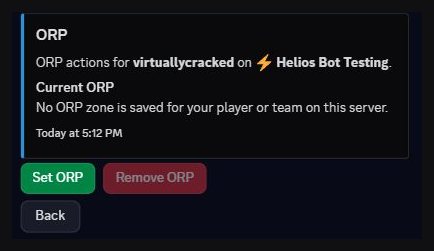
Remove ORP is unavailable when no matching zone is saved. This screenshot shows that empty state on Helios Bot Testing; no zone was removed for it.
Ordinary players do not need Manage Server permission for their own Player Actions menu. They need a linked account and a Premium game server. The menu does not grant staff access to other players' zones.
If the result is uncertain
| Result | Next step |
|---|---|
| No saved zone | Check the server and linked player before trying another action |
| Removed zone count | Reopen ORP and confirm the saved state |
| No ORP zone was removed | Check whether a matching zone still exists and contact staff if it does |
| Connection or verification problem | Check the current zone before repeating removal |
A new protection request is a separate action, with fresh placement and eligibility checks. Removing a zone does not wipe bags, currency, or player stats.
Staff: remove a player's ORP or all zones
Use /orp wipe for a selected game server, optionally targeting one user or gamertag. Leaving both player options empty targets all ORPs on that server. Review its confirmation before applying anything.
The ORP wipe guide covers that command. The main ORP guide covers settings and zone review; the Custom Zones guide covers the separate /zone system.