Helios Rust Console Bot Documentation
ORP Settings
Owner and admin guide for ORP Settings in Helios.
- Last reviewed
- Maintained by
- Helios RCE
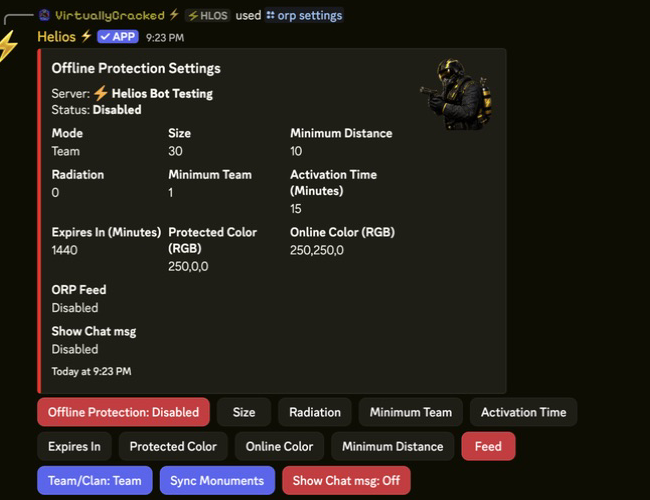
ORP Settings
For the current dashboard walkthrough, including dynamic sizing, roles, tracking, and timers, see Offline Protection. In the dashboard, open the selected server’s Offline Protection module, change the relevant settings, and use its Save control.
Overview
Use this page to configure ORP Settings values from the Helios admin panel and keep behavior consistent across servers.
Requirements
- Helios bot connected to at least one server in this guild.
- Discord permissions to run admin commands for this category.
- Correct server selected when the command supports
server:.
Setup Flow
- Run /orp settings server:"<SERVER>" for the target server.
- Review current values before changing anything.
- Update one setting at a time and submit each modal/button action.
- Re-open the panel and verify all values persisted correctly.
Commands Covered
/orp settings server:"<SERVER>"
Example
/orp settings server:"<SERVER>"
Notes
- NPC Damage and Allow Building are available in
/orp settingsand the dashboard. Both default to On and apply while offline protection is active. Online zones always allow both. - Saving zone settings updates existing Online, Pending, and Protected ORPs on this game server. Online zones stay online; protection-only rules apply when protection activates.
- Read the result message for the confirmed zone count. All Changes Saved alone does not prove every live zone update succeeded.
- If some updates cannot be confirmed, your settings stay saved. Reconnect the game server, then use Retry Zone Updates in the dashboard. There is no need to wipe or recreate the ORPs.
- If no existing zones are found, new zones use the saved setup. If the result asks for an ORP worker update, contact Helios support.
- Most admin commands require Manage Server (ManageGuild).
- Panel-based commands are user-scoped; each admin should open their own panel session.
- Some options on this page are premium-gated by server plan.