Helios Rust Console Bot Documentation
ORP Timers and Scheduled ZORP
Pause new ORP creation or schedule complete ZORP windows.
- Last reviewed
- Maintained by
- Helios RCE
Helios provides two different scheduling tools. Choose the one that matches what should happen to existing ORPs.
Dashboard setup
Open Offline Protection → Schedule and choose Creation Timer or Scheduled ZORP. Set both boundaries and the timezone, choose what should happen to existing zones where offered, then save. A creation block leaves existing protection alone; a Scheduled ZORP window can disable or delete existing zones.
Example: Block new ORP creation every day from 15:00 to 18:00 UTC for an event. Use Creation Timer when existing ORPs should keep working.
ORP Creation Timers
/orp timers server:"<SERVER>" toggle:On block_start:"Every Day" start_time:"15:00" block_end:"Every Day" end_time:"18:00" timezone:"UTC"
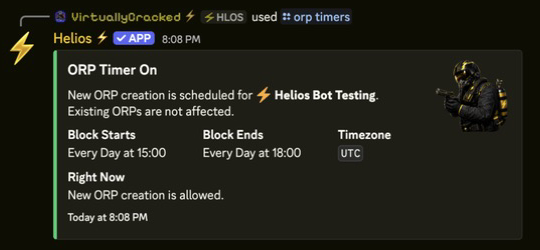
/orp timers blocks players from creating new ORPs during the scheduled window. Existing ORPs remain active and are not changed.
- On first activation, provide both boundaries and a timezone.
- Turning the timer Off keeps the saved schedule for later reuse.
- Weekly days and
Every Dayare supported. - Times use 24-hour
HH:MMformat with minute precision.
Scheduled ZORP
/orp scheduled-zorp server:"<SERVER>" toggle:On block_zorp:"Every Day" stop_zorp_time:"19:00" allow_zorp:"Every Day" start_zorp_time:"20:00" timezone:"UTC" wipe_zorp:True
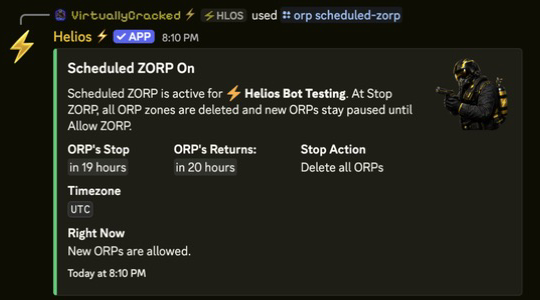
Scheduled ZORP pauses new ORP creation and also acts on existing ORP zones:
wipe_zorp:Truedeletes all ORPs when the stop window begins.wipe_zorp:Falsedisables existing ORPs and restores them when the allow window begins.- Turning the schedule Off retains its saved times.
ORP Setting Updates
Changes made in /orp settings save immediately. Updates to already-existing zones continue in the background, so do not repeatedly press the same panel control while that update is running.