Helios Rust Console Bot Documentation
/zone: Custom Zone Controls
Create, review, edit, and safely manage custom zones with the Helios Discord panel.
- Last reviewed
- Maintained by
- Helios RCE
Use /zone for trading areas, arenas, and no-build areas. It does not manage player-created ORP zones.
The Discord panel is Free and requires Manage Server. The website's zone editor requires Premium for the selected game server. Both control live game-server zones.
Open your own panel
/zone server:"<SERVER>"
Choose the server from Discord's suggestions. Only the person who opened the panel can use its controls; other staff should open their own panel.
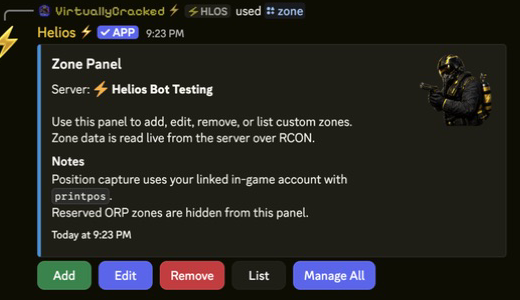
| Control | What it does |
|---|---|
| Add | Opens a draft. Nothing is created until Create Zone. |
| List | Reads zone names and enabled status; use page buttons for longer lists. |
| Edit | Selects an existing zone. Submitted edits apply immediately. |
| Remove | Selects a zone to delete. Check the name before confirming. |
| Manage All | Applies bulk rules to every non-ORP custom zone on this game server. |
Add a zone
- Choose Add.
- Set Name, Sphere / Box, and Size. A Sphere uses a radius and rotation
0; a Box has three size values and a rotation. - Stand at the intended location with your linked player online, then use Position to capture it.
- Choose the PvP, PvE, building damage, building permission, radiation, and boundary settings.
- Add short enter/leave messages and enable Chat Msg if you want them shown.
- Review the draft and click Create Zone only when ready.
Your Discord account must be linked to the player whose position you capture. Opening the draft does not place a zone. For website coordinate entry and screenshots, see the full zone guide.
Edit without surprises
In Edit, each submitted field or rule toggle applies immediately. There is no final Save button for the whole Discord panel. Back does not undo an edit. Refresh reads the current settings.
Use Enabled / Disabled to stop or restore a zone without deleting it. Those buttons are live changes too.
For a rename, choose a unique name. Names ignore capital letters. Helios creates and checks the replacement before removing the old zone. If it reports a partial failure, refresh and inspect both names before retrying. Update saved commands that refer to the old name.
If Rotation says the server did not report its value, the displayed 0 is a fallback, not a confirmed angle. Check or set the intended rotation before renaming.
Manage All is a live bulk change
Discord provides Show Area, Color, Show Chat Message, Allow PvP, Allow PvE, and Radiation. ORP zones are excluded; automated non-ORP zones are included.
WARNMixed does not mean off
If zones have mixed or unknown toggle values, the first click turns that rule On for all of them. Record individual settings first; another click does not restore each zone's previous rules.
Use Refresh to reread the combined state. Radiation 0 removes radiation from all affected zones, not just one.
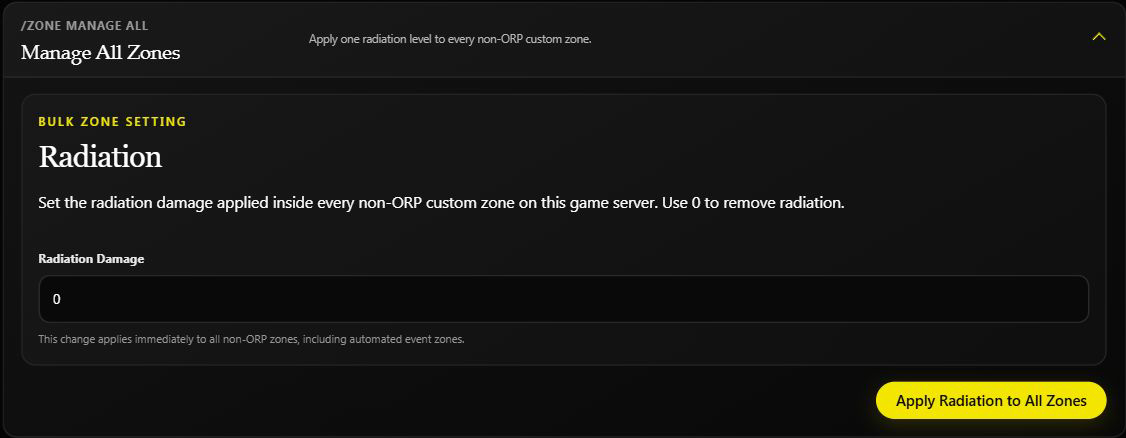
The Premium dashboard offers bulk radiation only. Its normal editable list hides reserved ORP and automated event zones, but bulk radiation still includes automated non-ORP zones.
If a request fails
Reopen /zone or use Refresh before repeating a change. An interrupted reply does not prove the game server ignored it.
Zones apply area rules; they do not grant entry by Discord role. Keep controlled damage/building tests on a separate testing server. See practical zone examples.