Helios Rust Console Bot Documentation
Economy Settings
Configure Helios economy settings, rewards, penalties, XP, and starting balances.
- Last reviewed
- Maintained by
- Helios RCE
For dashboard steps and screenshots, use Economy Setup. This page keeps the Discord command reference.
Overview
Run /economy to open the staff settings panel. You need Manage Server. Settings are shared by this Discord community; the command has no game-server selector. Controls belong to the staff member who opened the panel, so other staff should run their own /economy.
The dashboard Economy editor requires Premium. In Discord, free-tier settings include Three Card Poker, Chicken Crossing, Over/Under, Begging, PvP Rewards, Kill XP, Team Kills, Starting Balance, and Playtime Rewards. Daily Reward and the other game limits require Premium. See Casino Games for player access, which is different from editing the limits.
Use this page to set up kill rewards, game limits, XP, penalties, playtime rewards, and starting balances for newly linked players.
Setup
Use /economy to configure:
- Kill Rewards — reward players for PvP activity
- Game Limits — control limits for economy-based games
- XP Settings — manage XP earning behavior
- Penalties — adjust punishments or balance controls
- Starting Balances — choose the initial Wallet and Safe Pocket for eligible new accounts when they link; this does not reset existing accounts
- Playtime Rewards — give XP and currency bonuses for recorded online time, based on Discord roles
Example
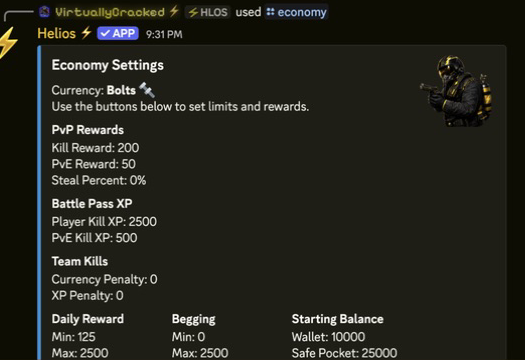
Playtime Rewards
Playtime Rewards automatically pay linked players who are online and have the required Discord role. Choose the amount and frequency in minutes: 60 is hourly, while 30 is every half hour of eligible recorded online time.
Each matching role reward is counted separately. A player with two rewarded roles can receive both payouts; Helios does not automatically pick only the highest-paying role. Currency goes to the Wallet, and XP goes to the Battle Pass. No player claim is needed.
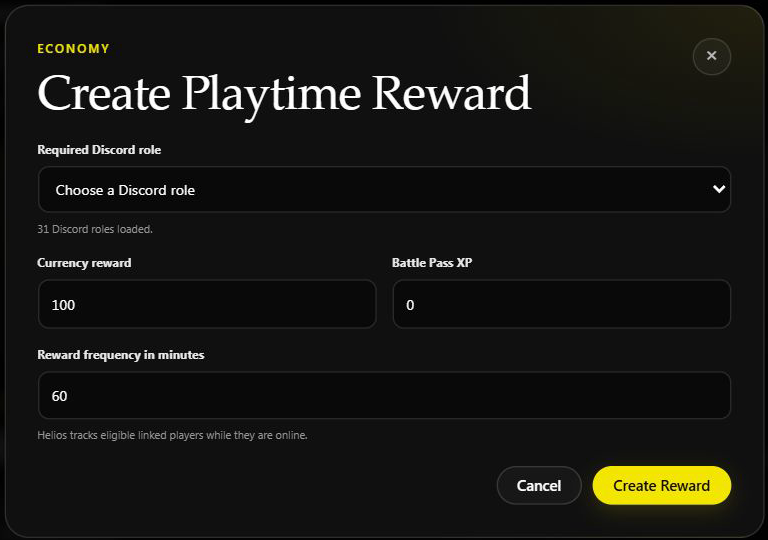
Open Playtime Rewards in Discord to add, edit, list or remove rewards. The screenshot shows the dashboard version of the same settings; it was not saved. See Economy Settings for the dashboard steps and troubleshooting.
Name and balance changes are separate
Set the Currency Name changes the label. Set Player Balances replaces a player's current total. Neither is the same as choosing reward payouts here.
Daily Reward coins are separate from the Daily Login Bonus streak. Changing the daily coin amount does not change the kit, item or XP reward configured for a login day.
Setup Flow
- Run
/economy - Adjust one system at a time
- Games
- Rewards
- Penalties
- Starting balance
- Playtime rewards
- Review min, max, and cooldown settings before saving
- Save your changes
- Monitor the player economy during each wipe
- Tune rewards if currency starts becoming too easy or too hard to earn