Helios Rust Console Bot Documentation
How to Set Up Autokits in Helios
Practical autokit setup guide for Rust Console owners using Helios, including role gating, bind validation, and post-wipe checks.
- Last updated
- Maintained by
- Helios RCE
What This Covers
- Setup sequence for role-gated autokits in Helios.
- Bind and destination checks that prevent claim drift.
- Validation and troubleshooting flow for post-wipe reliability.
Setup Prerequisites
- Finalized role and permission model from Permissions & Roles.
- Kit policy document (starter/VIP/event).
- Test accounts for admin and regular player claims.
Setup Steps
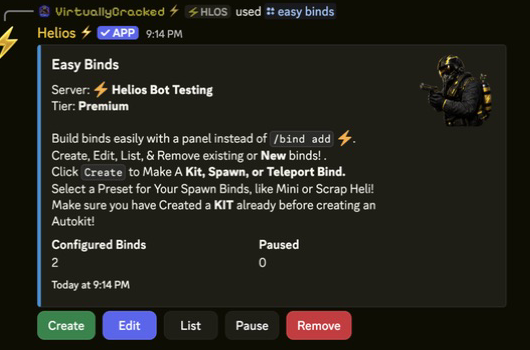
- Start with Autokit Setup.
- Expand to bind logic in Auto Kits and Binds.
- Verify related TP setup in TP/Home Setup.
- Validate after wipe with a full claim test pass.
Validation Checklist
- Kit eligibility works by role.
- Cooldown/claim behavior is consistent.
- Bind destinations are valid after map updates.
- Failed claims are actionable by support staff.
Troubleshooting Checkpoints
- Claim denied unexpectedly: verify role and account link requirements.
- Player claims wrong kit: verify bind mapping and policy logic.
- Post-wipe failures: rerun all destination and cooldown checks.
Related Guides
- Rust Console Autokits Page
- Autokit Setup Examples for Different Server Styles
- Common Rust Console Bot Setup Mistakes
Related Feature Pages
Next Steps
- Publish one autokit policy per role tier before launch.
- Validate bind targets and cooldowns with player test accounts.
- Add post-wipe autokit checks to your regular setup checklist.