Helios Rust Console Bot Documentation
Cooldown Manager
Reset Shop or Emote Bind wait times for everyone or a smaller group.
- Last reviewed
- Maintained by
- Helios RCE
Use the Cooldown Manager when players should be able to use a Shop product or Emote Bind again before its normal wait ends. This is a Premium admin tool. A reset clears the current wait; it does not change the cooldown setting for future uses.
Choose the smallest reset that helps
Open the dashboard for the correct game server, then expand Cooldown Manager on the overview page.
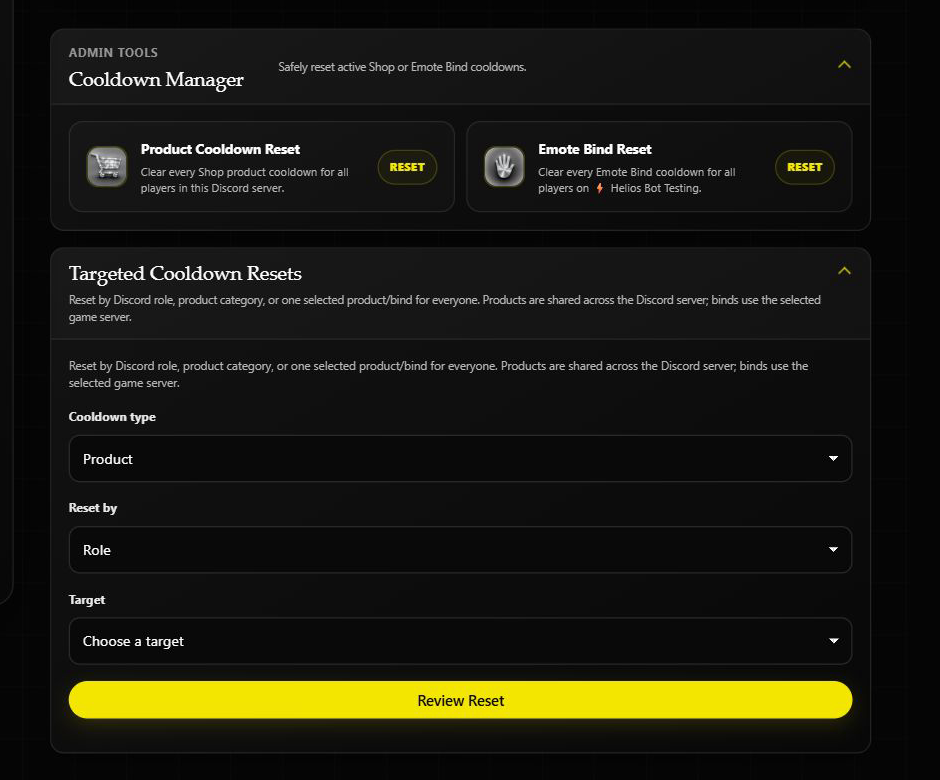
| Need | Where to go |
|---|---|
| Clear all Shop product waits | Product Cooldown Reset. This affects players across every connected game server in the same Discord community. |
| Clear all Emote Bind waits | Emote Bind Reset. This affects the selected game server only. |
| Clear a role's waits | Targeted Cooldown Resets → Reset by Role. Choose Product or Emote Bind first. |
| Clear a product category | Targeted Cooldown Resets → Product category. This choice is for Shop products only. |
| Clear one product or bind for everyone | Targeted Cooldown Resets → Selected product or bind for everyone. |
| Clear one player's wait | Find that player in Player Tools and choose the relevant cooldown reset. |
For a targeted reset, choose the cooldown type, how to narrow it, and the target. Read the confirmation carefully before completing it. Product resets cover this Discord community; Emote Bind resets use the game server currently selected in the dashboard.
If a role reset says no members were found, check the role and whether those players have linked their Rust account. If a bind or product is missing from the list, make sure it still exists and has a cooldown. For wipe-day resets of player progress or bags, use Wipe Center instead.